A little extension.A clearer view of your website.
Inspect metadata, headings, images, links and GEO signals in your Chrome side panel. The free MadeInRed extension reads the page locally, with no login or model calls.
Desktop Chrome 116+ · No sign-in · Local analysis · ZIP installation
Your page.Every useful detail.
Title. Content. Structure. Images. Links.
The information is already there.
Now you can see it, together.
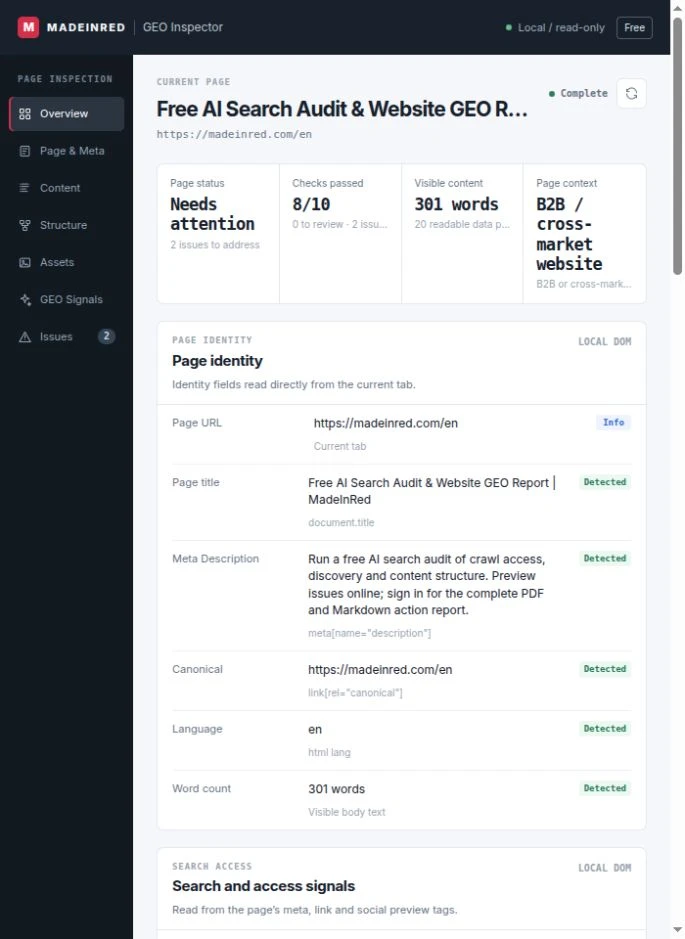
Open it. The details are there.
The side panel automatically reads the current page. Changing pages refreshes the results.
Your page stays in your browser.
Page content is analysed locally, with no model calls and no account required.
Built around your website.
From product information to company identity, inspect the signals that matter to your site.
Seven views.
One clear picture.
Choose a view to explore the information it shows. Every field comes from the current page.
The whole page, at a glance.
Page identity, check results and key issues in one place. Open the side panel to see what is on the current page.
A quick way to see whether a page explains itself clearly.
- URL
- Title
- Description
- Canonical
- Language
- Word count
Know exactly how a page identifies itself.
Inspect search metadata and social sharing tags. Missing fields stay visible, without repeatedly opening the page source.
Useful for product pages, landing pages and multilingual sites.
- Meta description
- Canonical
- Robots meta
- Open Graph
- Hreflang
- Viewport
See the structure behind the words.
Review text, headings and answer-shaped content blocks to see whether the page gives clear, useful information.
Local rules surface evidence for your own content decisions.
- H1
- Headings
- Word count
- Page entities
- Answer blocks
- Intent signals
Bring the page structure into view.
Read the heading hierarchy and JSON-LD fields to inspect what the page communicates to search engines.
Objects are shown when they exist on the page; missing data is labelled.
- H1–H6 tree
- JSON-LD
- @type
- Product
- Organization
- BreadcrumbList
Images and links, already organised.
Review image dimensions, alt text, internal and external links, and social domains to spot missing details.
A practical check for product imagery, editorial images and links.
- Image URL
- Dimensions
- Alt text
- Internal links
- External links
- Social domains
Read the page through an ecommerce lens.
Inspect product, company, market and answer signals so technical page information connects with your business context.
Technical signals help improve a page; they do not measure AI citations or rankings.
- Product signals
- Company identity
- Market signals
- Answer content
- Entity context
- Page intent
Find the issue. See the next action.
See the check status, page evidence and suggested next action together, with less switching between tools.
Start with the page issues you can actually see and change.
- Check status
- Page evidence
- Missing fields
- Suggested action
- Source labels
- Priority issues
Three steps.
Then just browse.
v0.3.0 / Chrome 116+- 01
Download & unzip
Download the ZIP and extract it. Keep the extension folder in a permanent location.
Download ZIP - 02
Load in Chrome
Open the address below, enable Developer mode, then choose “Load unpacked” and select the extension folder.
- 03
Open a website
Visit a public website and click MadeInRed in the extensions menu. The side panel opens and reads the page automatically.
No account needed
This download is a ZIP package for manual installation, not a Chrome Web Store listing. Upgrading? Replace the old folder, then click Reload on the extension card in Chrome.
A few useful
things to know.
Simple to use.
Clear about what it reads.
Do I need a MadeInRed account?
No. The extension displays local results directly in the Chrome side panel, whether or not you have an account.
Does it send page content to AI or incur usage fees?
No. This version reads the page DOM inside your browser. It makes no model calls, sends no page text to MadeInRed and uses no paid AI credits.
Why does installation request website access?
The side panel needs to read the current page to display its title, images, links and other details. Chrome may describe this as permission to “read and change site data”; the extension only reads the page.
Can it show traffic, backlink counts or actual AI citations?
This version shows technical information and GEO signals readable from the current page. It does not include third-party traffic data, backlink databases or measured AI citations.
How does it differ from the free website audit?
The extension is for checking the current page while you browse, with local results shown in the side panel. The website audit also checks public crawl access, robots.txt and sitemaps, and lets you claim PDF and Markdown reports after signing in.
Which browsers and pages are supported?
This version supports public HTTP / HTTPS pages in desktop Chrome 116 or newer. Browser internal pages, extension management pages and browser-protected pages cannot be read. Chrome on phones does not support installation.
Your next page.
A little more understood.
A free, useful addition to your everyday browser.